Manage your bookings with Drag and Drop
Here in UK we were able to resume dual flying with an instructor this week.
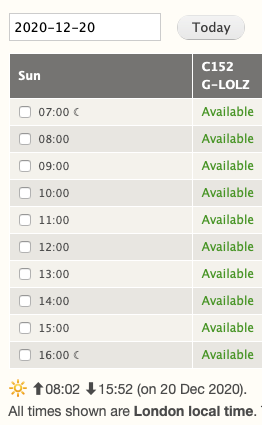
And perhaps as things get busier, you might find the following new feature useful: drag and drop.

This is our general news and announcements page.
Here in UK we were able to resume dual flying with an instructor this week.
And perhaps as things get busier, you might find the following new feature useful: drag and drop.

The new layout shows a popup if you hover over a booking or any unavailability period. It also combines slots into one cell, allowing more details to be shown such as times, aircraft or instructor (space permitting).
The Day View also features the equivalent of a time-bar. Any booking slots prior to the current time are shown greyed out (see the first two slots above). This makes it easy to see who should be active 'now'.

Thanks to one of our existing customers for this suggestion!
If you've used the system to manage your customers, you will already be aware of the built-in roles available. When setting up your users I expect you will have picked "Student" or "Member" for most of them, and perhaps a few people as "Office Staff".
You can now define your own roles (i.e. groups of users).
We're really pleased with how this feature turned out!
If your school sell logbooks, training books or your own merchandise, you can now set up a short list of products in the billing system. For each product, you choose what gets transferred to a customer invoice, the price, tax code and accounts code (if you use them). Doing this setup once makes it a lot quicker to sell products and means your instructors and office staff can avoid worrying about using the wrong tax code or price.
Most people use the system on a smart phone, which is a more personal device than a computer. So it makes sense to leave users logged in for extended periods for convenience. But some people find themselves having to use a shared computer sometimes, perhaps in the flying school. That's why this option exists:

The system was developed with a field to record fuel added before booking out. This suits schools that provide their own fuel bowser or jerrycans.
But if you use fuel from an airfield fuel pump and want to record this in the log, this has always been a number of steps: booking out for the taxi to the pump, booking back in and out again with the fuel added.
But now you can record fuel added before booking out or when adding flight details.
This request has come up a few times, mainly for night flying. Normal bookings are by picking time slots, but instructors can now make bookings outside their working hours by clicking make a manual booking.

The system has a feature to allow you to send all flights, (including those out of airport hours) to any email address you like. The intended use is for the airport operator to more easily record flights out of hours. The email contains a link to a list of flights for the previous week. It contains only the flight and aircraft details; personal information is removed.
There is now an example link for you to view your flight summary to see how the information is presented.
Newsletters, booking confirmations, reminders and follow-up emails are sent by the system with your school email address in the "reply-to" field. That means if your customer replies to your newsletter or booking confirmation, it will be sent direct from them to you.
Have you ever wanted to send a newsletter at a particular time? Perhaps what you're writing is time-sensitive, and you want to promote a particular event or price reduction at a certain time. Or maybe you just want to maintain that professional image by only emailing in office hours! The newsletter form now includes a date and time field so you can choose when the newsletter is sent.