
We have made a little improvement to the booking system with a new setting for short notice bookings.
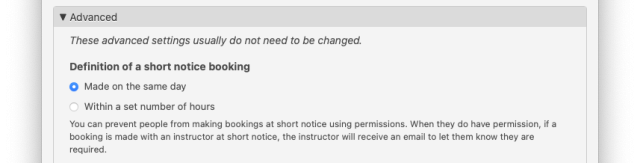
This setting together with a new permission means you can now restrict certain roles from making bookings at short notice. The setting defines what short notice actually is: either until the end of the day or within the next few hours. Currently your system is set up that short notice is within 24 hours, and everyone you've allowed to make their own booking can make them at short notice.
If you would like to prevent people (for example students) from making bookings on the same day as their flight, there is a new permission called "Make short notice booking" under Admin > Bookings > Permissions. Just remove the tick from the student column and save the permissions.
Then under Admin > Bookings, open the Advanced section and check your definition of short notice. You can either leave it as 24 hours, or change it to "made on the same day".
This will mean students can no longer book at short notice, and they will see a message asking them to contact the office (or their instructor) to make the booking.