
Your booking system lets students pair any instructor with any aircraft, even if that instructor isn't qualified to teach on it. For example, you might have instructors for 3-axis and others for flexwing microlight training. Or perhaps an instructor recently lost his or her medical, and for now can only teach ground school.
That has meant catching the mismatch yourself, or making sure all students realise which instructors are available for their type of aircraft.
That changes with today's update.
What you can now set up
For each instructor, you can specify exactly which aircraft they're able to give training on. It's quick to configure under each instructor's Settings tab, and once it's done, the system takes care of the rest.
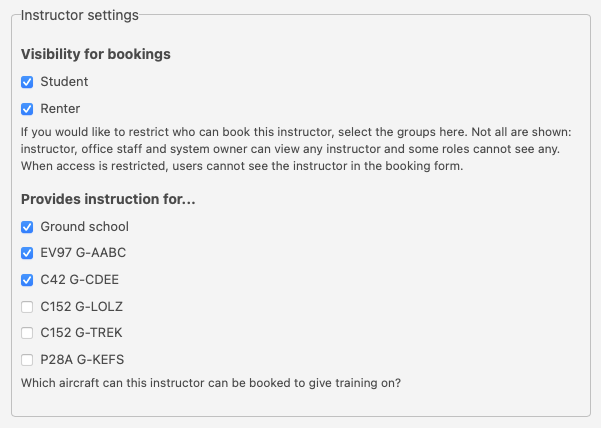
These settings are also on each aircraft's Settings tab, which - for many of you - will be quicker to set up.
What your students will see
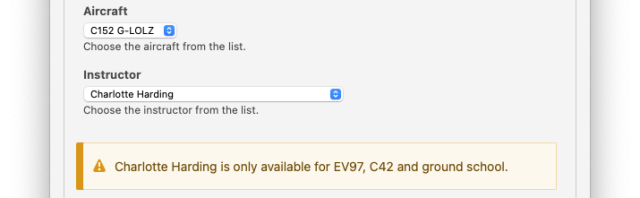
When a student picks an instructor, they'll now see a clear note in the booking form showing which aircraft (or types) the instructor teaches on.
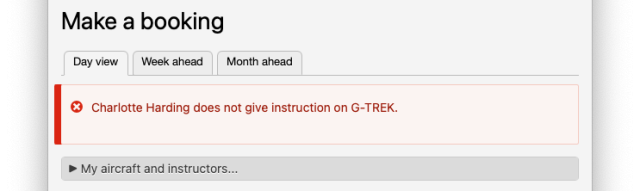
If they try to book an aircraft that isn't compatible, they'll see a message explaining the issue.
You're still in control
If you need to make an exception, as office staff, you can. You'll see a warning so you're aware of what you're overriding, then you can confirm the booking.
A note on ground school
Instructors can be set for ground school only, or dual training only, or both.