
We were asked a question by a couple of schools, and it's worth sharing online. The question was whether it was possible to set up a monitor in the clubroom to display the current day's bookings, just like the booking form. Except, unlike the booking form it should not be possible to make any changes: this is for display only.
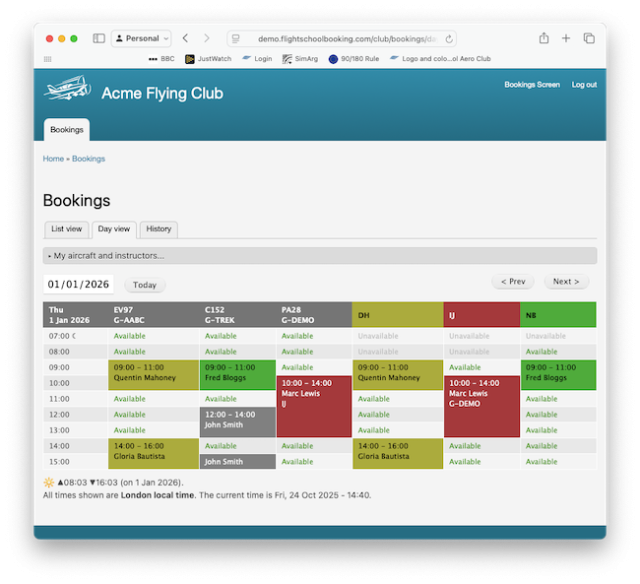
Flight School Booking has a comprehensive permissions system, which allows you to set this up securely. This is important for a machine that might be accessed (or accessible) by the public.
If this is of any interest to you, here are some steps to configure this in your own system:
1. Add a new role called “Bookings Screen” from People > Roles.
2. Add a new user called “Bookings Screen” from People, with only the role "Bookings Screen" ticked. It will need an email address in order to log in just like everyone else.
3. Set the permissions for the new role from People > Permissions. Select ‘View the list of bookings (all users and aircraft)’ to grant access to the Bookings tab. If your customers consented to their names being shown on the office display, also select 'View and autocomplete people's names'. This will show customer names in each booking. Otherwise, if you prefer this public display to show only “busy”, leave the permission regarding people’s names un-ticked.
4. For each aircraft and each instructor, use their Settings tab to make them visible to the Bookings Screen role. Be careful on the instructors that you pick the right part of the form: do not add this role to an instructor, look for the section lower down labelled “Visibility for bookings”. There might be some aircraft or instructors you would prefer not be visible on the clubroom screen. For these resources, just leave their visibility for bookings unchanged.
5. Log in on the office display and click on the Bookings tab. Select which aircraft and instructors to show in the day view. We recommend picking “Select all” together with the option to hide any that are unavailable that day.
The day view will refresh every five minutes or so automatically.
You may instead want to show the list of aircraft currently booked out. To do this, use People > Permissions and tick "View booked out aircraft". This page will also reload every few minutes.